
What’s new in 2026
As of
Marionnet was thoroughly reworked in 2026. Here, in nine points, is what changes for teachers, for students and for those who administer teaching labs. Each card leads to its section, where the technical details are folded away and open with a click.
Installing through the package manager
Marionnet now installs like any other software on your distribution, that is, through its
package manager: a signed apt repository for Debian, Ubuntu and their derivatives, and a
signed dnf repository, which zypper reads as well, for Fedora, Rocky Linux, AlmaLinux
and openSUSE. On other distributions, the installer marionnet-install.sh downloads and
sets up a precompiled tarball.
The guest system images and the kernels are downloaded separately, because they take up
several gigabytes. The marionnet-get-images command lists them in the terminal, as a
checklist.
The systems tested, and the limitation of Rocky Linux and AlmaLinux 10
This version was installed in a container of each of the following systems, then tested: Ubuntu 20.04 to 26.04, Debian 11 to 13, Rocky Linux and AlmaLinux 9 and 10, Fedora 42 and openSUSE Leap 16.0. The full guide gives the number of test cases for each one.
Rocky Linux and AlmaLinux 10 no longer ship 32-bit libraries, so the 32-bit kernel cannot be installed there, and neither can routers, whose image is 32-bit. A 64-bit router image is planned.
Checking the key that signs the repositories
The signature mainly protects updates: a machine where Marionnet is already installed checks every package against the key it keeps on its own disk. For the very first installation, however, you need to compare the key’s fingerprint with a source other than this website, such as the project’s git repository, a printed handout, or a machine where Marionnet is already installed.
4A65 3434 0BF9 7733 E74C 9DFC 12E4 6000 225F 0E56
A teaching lab with no internet access
Copy the site’s release directory once to a local server, and every machine fetches its images and kernels from there: the installer accepts a local directory wherever it expects an address.
The quick install guide gives the commands to copy; the full guide explains each of them.
$ echo 'deb [signed-by=/etc/apt/keyrings/marionnet.asc] https://www.marionnet.org/download/apt/ ./' \
    | sudo tee /etc/apt/sources.list.d/marionnet.list
$ sudo apt update
$ sudo apt install marionnet
$ marionnet-get-images
No more root daemon
Until now, Marionnet only worked fully alongside a second program, marionnet-daemon, which
had to be installed separately and kept running permanently as a service, under the root
account, even when nobody was using Marionnet. It created the host network interfaces that
the virtual machines need (the taps), and it accepted requests from any account on the
machine.
This daemon is gone, and that is also what lets Marionnet install like ordinary software. For those who administer teaching labs, that is one fewer root service on every machine.
What replaces it: a sudoers rule, granted block by block
The few privileged operations now go through sudo. Each one is handed to a small script that checks its arguments before acting, and the sudoers rule names only these scripts. It is split into three blocks: a base block that everything else needs, then one block for the NAT bridge and one for the LAN bridge (see the next section).
The administrator grants each block to one account, to several, or to a whole classroom through a group, and can also deny any of them permanently. If a block has not been granted in advance, Marionnet asks the user for their own sudo password when the bridge is started.
Section 7 of the full guide describes each block and what it allows the account to do on the machine.
Reaching the real network: Gateway, NAT bridge, LAN bridge
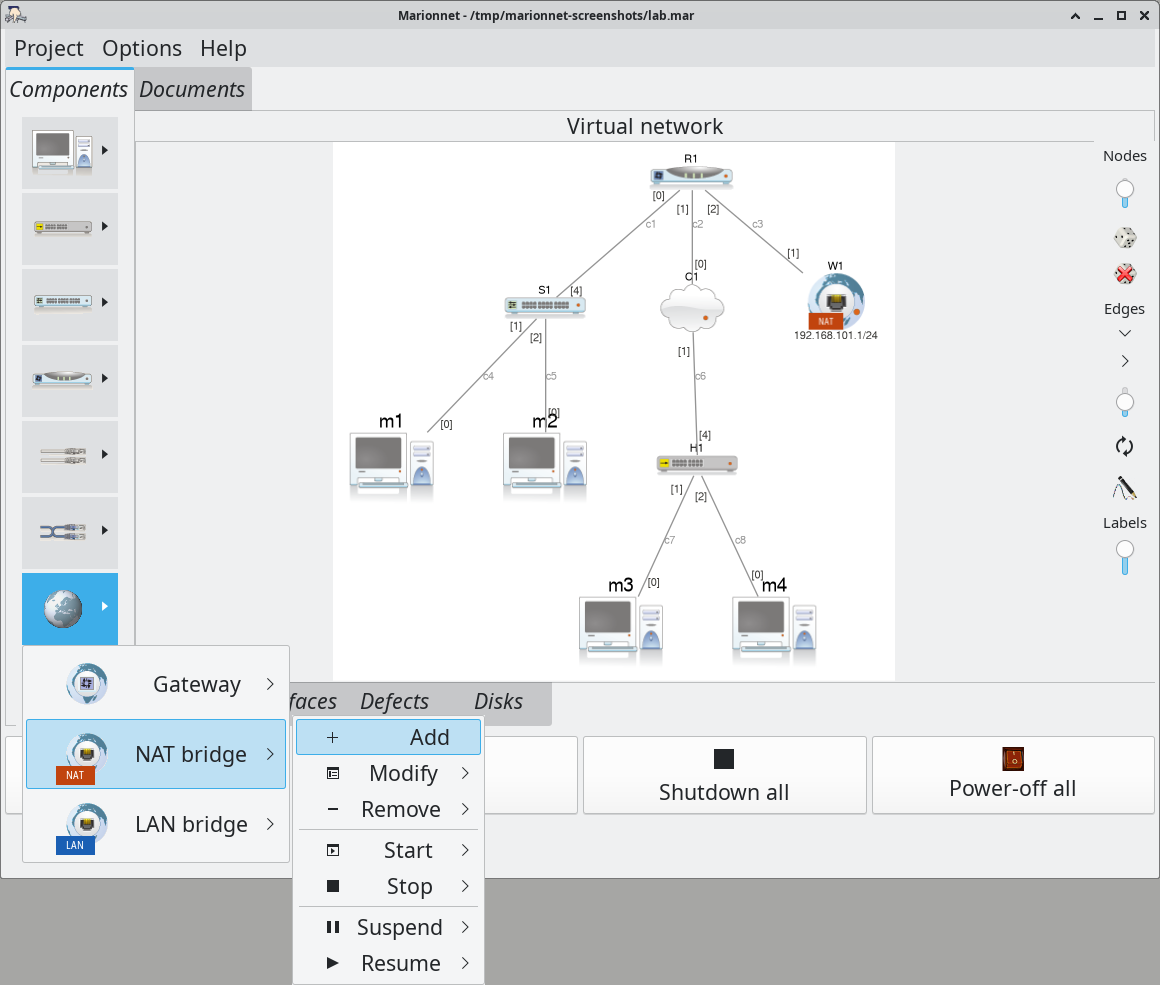
Access to the real network is now a device you place on the network diagram, like a hub or a switch. The “planet” button of the palette offers three of them:
- Gateway, the original component, available since 2011, which needs no privileges but
only reproduces part of the TCP/IP stack: a
ping, for instance, does not get through; - NAT bridge, new, its natural successor: it creates a private network on the host, reserved for the virtual machines, which carries the whole TCP/IP stack, with DHCP, DNS and, if you wish, IPv6;
- LAN bridge, which puts the virtual machines directly on the host’s local network.
The NAT bridge and the LAN bridge change the host’s network, so the administrator authorises them through the sudoers rule described in the previous section.
The Gateway, and its limits
The Gateway is a small program on the host, running under the user’s own account, which is
why it needs no privileges. It simulates the essentials of the TCP/IP stack for the virtual
machines, but not all of it: ICMP, in IPv4 as in IPv6, is not simulated, so a ping to the
outside fails. The NAT bridge has no such limit, since its packets go through the host’s
real network stack; from the user’s point of view, it is also the closest to the Gateway.
The NAT bridge in detail
It creates a private bridge on the host: a small network reserved for the virtual machines, which reaches the Internet through address translation (NAT). A DHCP and DNS server hands out addresses and resolves names. IPv6 can be added, with a local prefix, router advertisements and NAT66. The NAT bridge has a built-in switch, with 1 to 16 ports, to which the machines are connected directly. Each NAT bridge placed on the diagram is a separate network.
The LAN bridge in detail
Each virtual machine appears on the local network with its own MAC address. Marionnet builds the bridge itself; previously, it had to be configured by hand on the host. It does not work over a Wi-Fi card, because an access point does not accept several MAC addresses behind a single connection.
A switch that accepts any cable
Like most current switches, a Marionnet switch can now detect the wiring by itself: when ticked in its settings, the Auto MDI-X option makes a straight cable work like a crossover one on all its ports. It is unticked by default, so that choosing the right cable remains an exercise, and older projects keep their behaviour.
The startup configuration of a switch, written in VDE’s command language (to create VLANs, for instance), no longer runs blind: every answer of the switch is recorded in a log, where a refused command can be read with the reason for the refusal.
What a switch says about itself while it runs
Through the scripting interface, the switch-info command queries a running switch and
returns its four tables: its ports, the MAC addresses it has learnt, its VLANs and the
state of the spanning tree (FSTP, VDE’s fast spanning tree). The log command returns the log of its startup
configuration, even once the switch has stopped. A lab’s correction key can thus check
that a port really is in the required VLAN.
Controlling Marionnet by script, or by an AI
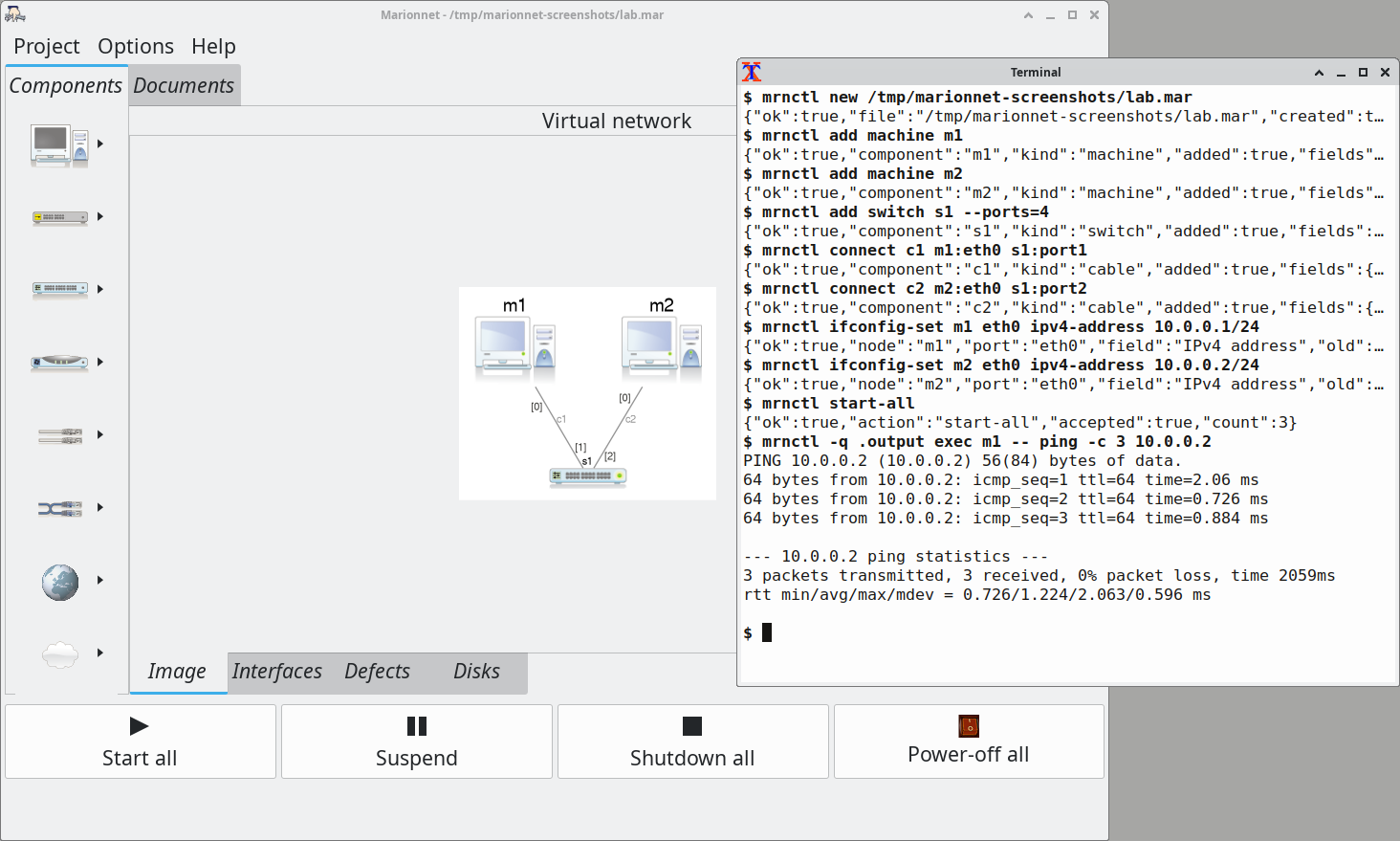
Started with the --control-socket option, Marionnet opens its window as usual, and the mouse
still works in it. At the same time, it accepts commands sent from a terminal with mrnctl:
create machines, connect them, give them an address, start them, read what happens inside
them, save the project. A teacher can therefore build a lab with a script rather than with
the mouse, and check it before handing it out.
Marking a lab with a file of assertions
The teacher writes the answer key only once, as a file of assertions (one per line), which
the mrn-verify command replays against each student’s project, opened in Marionnet.
Every student’s work is thus marked against the same tests.
A guide written for an AI agent
Since every response from the control channel is a single line of JSON, an AI agent able to run commands can drive Marionnet. Marionnet provides it with a skill, that is, a procedure written for the agent, which helps it design a lab with the teacher, run it, then mark the students' sessions.
Further reading: the teacher’s guide, from preparing a lab to marking it; the control channel; the procedure an AI agent follows.
Projects saved as text
A Marionnet project (a .mar file) is a compressed archive that describes the virtual
network. Until now, its content was written in the program’s own binary format, which nothing
but Marionnet could read. It is now written as text: JSON for the description of
the network (machines, routers, switches, cables) and ordinary scripts for the startup
configurations. A project can therefore be read, compared with another one using diff, and
kept under version control with git: a lab in which one address changed shows one changed
line.
What this changes for a teacher assisted by an AI
An AI agent assisting the teacher can open a project and read the network of a lab without starting Marionnet: explain a lab handed over by a colleague, compare a student’s work with the answer, find what changed from one year to the next. The comparison is meaningful, because a project that was not modified is written back identically. The agent reads but does not write: Marionnet remains the only program that produces a project, and the agent changes it through the control channel (previous section).
Old projects, and a precaution before saving them
Marionnet still reads the formats it wrote in the past. However, an old project saved by this version is converted to the new format, and an earlier version of Marionnet will no longer be able to open it. If some machines have not been updated yet, keep a copy of the file before saving it.
Further reading: the version 3 project format.
Exam mode records the session
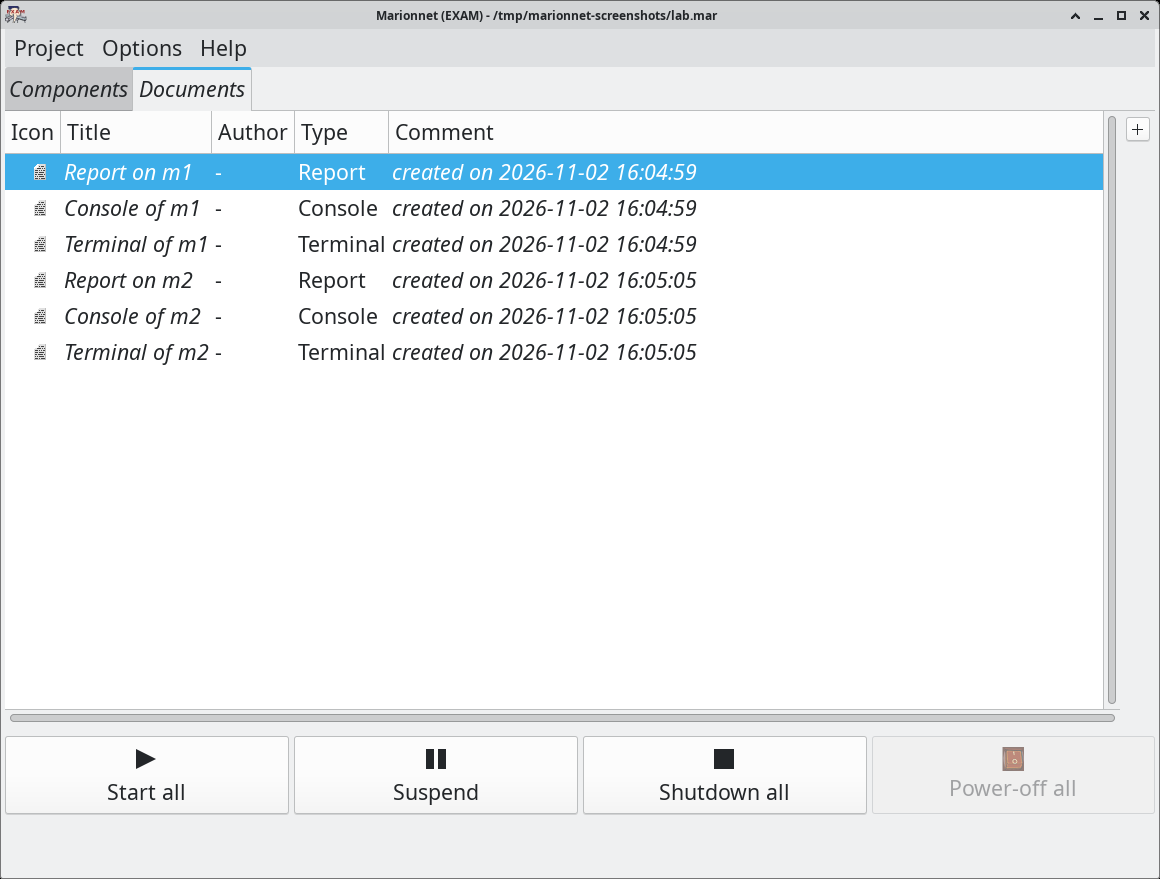
Started with marionnet --exam, Marionnet keeps, for each machine and each router, a report
on the system’s final state (interfaces, routes, firewall, services…), a timestamped history
of the commands typed, the guest system’s console, and the terminal recording, which holds the
commands together with their output. These documents are stored in the project, in the
Documents tab, when the machine shuts down cleanly.
Which documents a mark can rely on
The report and the history are written inside the virtual machine, so in a system the student administers and can modify. The console and the terminal, on the other hand, are written by Marionnet on the host, out of the student’s reach. Marking can rely on these.
What exam mode blocks
Since the documents are only stored when a machine shuts down cleanly, exam mode blocks the actions that would skip this step, such as the “Power-off all” button. By contrast, quitting Marionnet or closing the project shuts every machine down cleanly, waits until they are all off, then saves the project.
Further reading: exam mode.
12 complete translations
Written in English (en), Marionnet’s interface is translated into German (de), Spanish (es), Esperanto (eo), French (fr), Greek (el), Italian (it), Portuguese (pt), Brazilian Portuguese (pt_BR), Romanian (ro), Russian (ru), Slovak (sk) and Turkish (tr). All 12 translations are complete: each one covers the interface’s 442 messages, including the dialogs and help texts of the new components.
Volunteers had started about ten of these translations over the years. They were carefully completed in 2026 with the help of AI, which also produced the translations that were missing: the terminology was settled first, then applied catalogue by catalogue.
Recent kernels and guest systems
Marionnet comes with a Linux 6.12 kernel, in 64 and 32 bits, and a Debian 13 (trixie) image for the machines. The Debian 7 (wheezy) image and the small image called guignol, which routers also use, are still published; both use the 32-bit kernel.
When an old project names a kernel or a distribution that is no longer published, Marionnet replaces them when the project is opened, then lists what it adapted in a window.
What is replaced, and the exception of saved disks
Kernels 2.6 and 3.2, which no longer boot on recent hosts, are replaced by 6.12; a discontinued distribution, such as Mandriva, by Debian 13. There is one exception: a machine whose disk state was saved in the project, because that state only matches its original image. If that image is gone, the machine is left out of the opened project, and the window says so.
Why the kernel also runs on older distributions
A UML (User-Mode Linux) kernel is an ordinary program on the host, so it depends on the host’s C library. It was compiled so that it also runs on the oldest distributions that Marionnet supports.
A hidden interface without a kernel patch
Each virtual machine has a service interface, eth42, which links it to the host to
display its graphical applications. A kernel patch, written by Luca Saiu and later updated by
Jonathan Roudière, made it invisible to students: this was “ghostification”. It is now kept in a
hidden network namespace of the machine: students no longer see it with ip a, and the
published kernel no longer needs that patch. This concealment serves teaching, not security: the machine’s
administrator could find it again, which the patch prevented.
Section 5 of the full guide explains how to choose and install the images, and where they go.